
Let's turn your ideas into an effective tool!

Advanced Custom Fields Plugin for WordPress: Purpose and Benefits

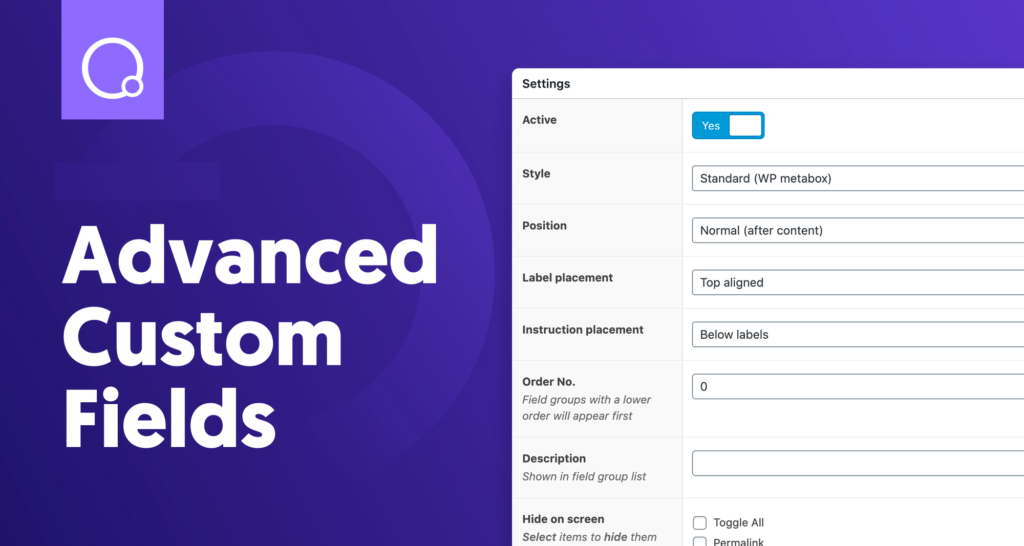
The popular plugin for developers Advanced Custom Fields for WordPress allows you to add the necessary meta fields and display their values in the right places on the site. It gives you full control over edit screens and custom field data. After installing the constructor, you can add fields on request throughout the “engine”. The developers offer the program in a free version and a paid PRO version with advanced functionality and many ready theme templates.

What is this software product

Advanced Custom Fields (ACF) has gained popularity among users of web resources on the WordPress engine, as evidenced by over 1 million installations. The ACF constructor gives developers unlimited possibilities to create a rich interface.

Random (custom) fields have more than two dozen varieties of presets, which simplifies and speeds up the process. The presets include different field formats:

  • digital – Number (with min/max values, which are not required);
  • for specifying mail – Email (including validation);
  • text – Text (1 line), Text Area (2 or more lines);
  • to enter a password with masking – Password.

The constructor has a WordPress editor with media insertion files, image uploads, checkboxes, dropdown menus. With Advanced Custom Fields for WordPress, you can set a basic True/False selector, customize element selection, single or multi-user selection, and collect fields into multiple tabs. The plugin menu has functions for returning URLs, post and page objects, taxonomy IDs, and other important options.

Developers can use extensions to create rules for displaying custom fields in desired post categories. The Repeater Field option allows you to create complex layouts, Gallery Field – to manage a photo gallery, Nav Menu Field – to organize navigation, etc.

For what purposes is it used

This WordPress plugin contains over 30 different types of custom fields. Their use allows you to use the calendar, checkboxes, navigation, maps and other administrative elements. Fields can be added in different places of the site – comments, messages, taxonomies, posts, options pages. Why a developer needs the Advanced Custom Fields plugin:

  • storage of important data in one place;
  • use of the same data many times;
  • changing the style of displaying information in the constructor, and not on a separate page;
  • organization of events with a large number of pages that are displayed in the same style;
  • managing custom fields in the admin panel.

The free version of Advance plugin provides access to almost all tools. But using the paid option gives more options: checking fields and groups in posts, simplified data entry and visualization, designing pages through layouts, loading several images into one field.
Benefits

According to statistics, in more than a million sites, developers use ACF. Custom fields help create a functional interface for work. Benefits of setting Advanced Custom Fields:

  • simple and intuitive process;
  • over 30 custom fields;
  • an extensive database of tools and documents;
  • consistency of information presented in a single format;
  • easy entry and updating of data.

Plugin ACF simplifies the process of entering and editing information as much as possible. It helps form a simple and functional interface for adding, managing and displaying meta fields on pages.

Easy plugin setup

According to the developers, setting up Advanced Custom Fields does not cause any difficulties. In the WP engine, you need to find the plugins section “Add New” category and select the custom fields constructor. It remains to click the “Install” button and activate the plugin. Alternatively, you can download it from the WordPress directory and then install it on your website from FTP.

More difficult work is customizing – setting up the program, that is, creating custom fields. Let’s consider an example of how the customization operation should be carried out to place data about webinars. In this case, the development of a WordPress site will include several fields:

  • name;
  • picture;
  • description;
  • start date;
  • button with active link.

In the plugin settings you need to find the “Field groups” menu and select the “Add” button. Custom fields will be different, but still refer to the same information. In the “Properties” list, it remains to select options such as label and field type, and repeat the steps to customize (customise) each of them.

Examples of use with the WooCommerce plugin

WooCommerce for WordPress allows you to create an online store based on CMS. Applications can be used together. With the help of such programs it is easy to set up different sites. Advanced Custom Fields WooCommerce Examples:

  • Real Estate – add information about the type of real estate, lease, terms of sale, footage, etc.
  • Cinema pictures – information about the director, studio, film genre, actors.
  • Client site – you can display a slider with several lines of text and make changes to it at the request of the customer.

The great potential of the plugin shows why it has become so popular among developers. The program allows you to organize the most simple, convenient and functional site administration interface.


What will be popular in 2021 among e-commerce?

Business loves those people who win through a competent analysis of the situation and the ability to adapt to it in order to never fall behind. An important topic of conversation are the key trends in online sales that are relevant throughout 2021. Get ready for them today.

Very simple interface

Every year, marketing and competition in it is growing rapidly, which is why online stores should be liked by users from the first acquaintance, because you can easily lose it by releasing it to competitors. How to like your customers? The design of the site is as simple and convenient as possible. A potential client may immediately want to stay in it, since everything is clear to him.

Shopping from smartphone

For the past 5 years, mobile Internet connections have outnumbered those of PCs. Previously, many people thought that a smartphone is an entertainment place (social networks, instant messengers, game applications), but now most purchases are made from a phone, not from a PC. The key to success is a high-quality mobile version of the site that will help the business survive on the Internet.

AR technologies

In the past, online shopping was seen by many as something that didn’t really matter on the outside, and fitting and fitting items, such as clothing and furniture, should only be purchased on the shelves in a physical store. Today, thanks to augmented reality, all past facets are erased. You can take and organize a virtual fitting in your smartphone, sitting comfortably at home.

Chat bots and search by voice

Voice search, in a large proportion, is used to find the desired site in a search engine. Very little is left before the moment when voice bots appear on websites in order to help customers find the right product, easily describe it and help place orders. Having managed to implement such functionality in an online store before competitors, you can bring the business to the maximum positions extremely quickly and with a large degree of efficiency.

Trends for 2021 are incurable, but this article highlights key points that will help you reshape your business ahead of the competition.

Google is changing the layout of the site, what will affect on SEO

A new meeting with webmasters from Google employee John Mueller was not the best for them. Website development will change because new requirements for SEO will appear.

With layout design updates, sites will change in rankings. It won’t affect legacy URLs and content either.

One of the webmasters told John Mueller that with the recent redesign of his blog, he has moved away from WordPress, using the Hugo static site generator to publish his own posts. The content and structure of the site’s URL did not change. The question for a Google employee was about future changes in rankings.

Muller replied that the changes could affect SEO. Innovation can be both good and bad. Most of the standard templates will now need to be further developed. This also applies to templates that are marked “SEO optimized”, as well as those templates that require styling, CSS updates with improvements to various HTML elements.

It turns out that the design of the site does not need to be changed, but thorough rechecking can still be done.

Website Design 2020: The Most Trendy Components

The expansion of innovative technologies contributes to the emergence of new opportunities that fundamentally improve the quality of modern web projects. The most important thing here is design. Often, modern website design is an interactive chain that lures users into its ranks, attracts with content and keeps them for a long time. Innovations in the world of technology do not stand still. Let’s take a closer look at what’s popular in 2020.

Interactive and responsive design: Development website of new generation

A few simple solutions can increase interest to the resource. A beautiful website design implies completely different characteristics and parameters.

  • Famous and popular trend of today is the adaptability of design. That is, the site is displayed on any device with various display extensions. Many users prefer mobile devices to surf the web. The key point of browsing sites on mobile gadgets is the menu button, which helps users navigate to directories, shopping cart and similar pages. By adding chatbots to online stores with adaptive design, websites have turned into something new and extremely technological.
  • Interactivity is another point to bring design to life. Large format embedded videos, along with elements that react with animations on the cursor, are the main engines of progress in interactivity that is interesting for the user.
  • White space in website design focuses the attention of users on important elements that the developers wanted to highlight. Properly maintained spacing in the middle of important blocks is so simple, but effective. Such sites can be confused with minimalism, but this is not so. Here, the minimum number of color schemes, buttons, and other elements of the design addition are distinguished.
  • Site support is an elementary need to help users. It is chat bots (special software scripts) that provide advice on issues programmed by developers that are most relevant.

New trends keep up with innovative technologies. Stay up to date with the most important innovations in the world of design!

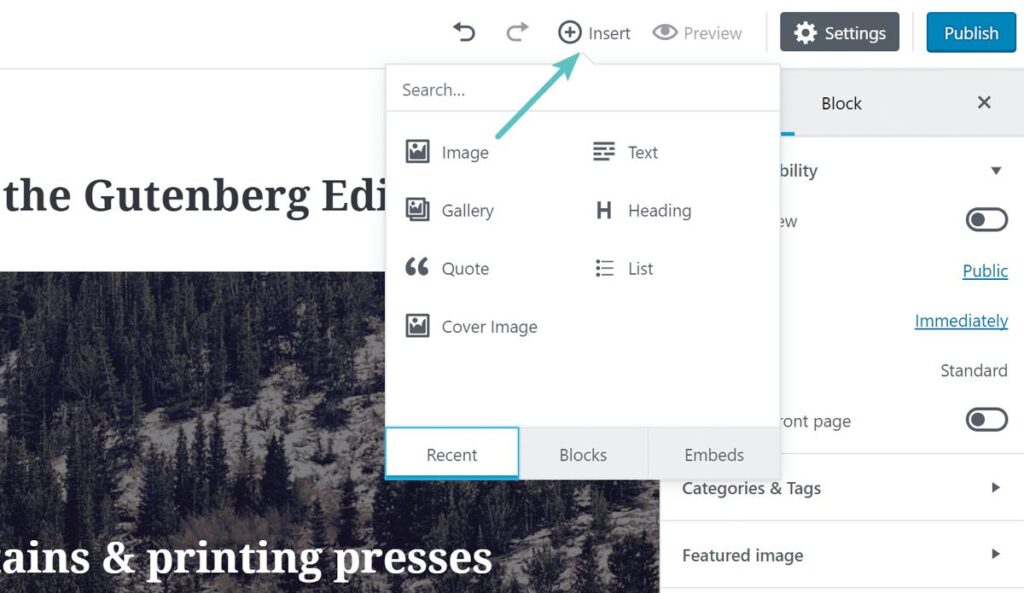
Gutenberg editor: what is useful and why he is needed

Three years ago, WordPress announced that it was starting to develop a new built-in Gutenberg editor. A year later, the application appeared in beta as a plugin, and the WordPress 5.0 version of Gutenberg became a full-fledged editor. 8.5 Gutenberg is out recently, but about that later.

The Gutenberg editor, according to WordPress representatives, is revolutionary in terms of customization, as well as in terms of creating sites. Success web will tell you the main advantages of the plugin and its shortcomings.

Who is best suited for Gutenberg?

ОExperienced content managers bypass Gutenberg, because here almost everything is different. Frequent problems: plug-in edits that do not work with the program. Gutenberg is best suited for beginners, who will find it easier to deal with tasks in it, for example, for one-pagers, there are many different blocks.

The content block format is a huge plus

Gutenberg differents from the classic editor by working with content blocks (each is a separate block: paragraph, photo, quote …). The editor interface has changed, but the main innovation is the content format. Thanks to Gutenberg, the world has got articles with even more different and richer design options. The idea is cool, because you don’t need to interact much with HTML or CSS.

Plugin features

Cancellation of shortcodes for embedding publications from other sites – now you just need to choose a site among 30 offered (Youtube, Facebook, Instagram, etc.), and then insert a link.

  • Buttons no need to be embedded due to additional shortcodes with plugins;
  • Appeared anchors for links to sections of the article ;
  • Possibility to add text on the photo inside the editor.

Flaws Gutenberg

The WordPress 5.0 Gutenberg version has become more complex instead of simpler.

  • In the blog engine, post markup is based on the markdown approach, which is easier and faster. Insread in Gutenberg it turned out more confusing and longer;
  • Old plugins do not work with Gutenberg (additional markup programs, etc.).

Disabling Gutenberg WordPress

If the WordPress version is 5.1.1, and working in the classic editor is more convenient, then you need to install the official plugins Classic Editor and Disable Gutenberg. It is worth adding that support for the classic editor will end on December 31, 2021.

Gutenberg 8.5: what is new?

On August 11, a new WordPress Gutenberg update will appear, which will include the ability to upload images from external resources and edit photos in galleries. The update itself is not innovative, it is only complemented by minor improvements and improvements (the ability to drag and drop blocks has been improved, while reusable blocks are now located in a separate tab).

Highlight the most useful plugin innovations:

  • You can now add an HTML anchor/ID to each static block (no need to switch to code editing mode);
  • Support for dragging multiple blocks;
  • Adding photos from third-party URLs (the image is loaded by the link into the media library). The upload process is manual – with the insertion of a photo by URL, a download icon and up arrow appeared in the editor toolbar, which you need to click on add the picture itself to the media library;
  • New button for editing individual photos in the gallery block, where you can change images point by point;
  • Reusable blocks appeared in a separate tab (there are only 3 tabs: Blocks, Patterns and Reusable).

Why choose WordPress?

Website development is associated with the choice of CMS or content management system. She is responsible for creating, managing and editing the entire web resource and content in general. There are paid and free options. Many users have heard of WordPress at least once, but not everyone knows what it is. Let’s figure it out.

WordPress – site content management system developed under the GNU GPL license. This means that it is completely free for commercial use.

The system has millions of users around the world. According to various surveys, WordPress is used by 27% of websites worldwide. This means that every fourth Internet resource on the planet is built on WordPress..

Top reasons for choosing WordPress

Many people succumb to the collective trend and order the creation of a site on this CMS. Millions cannot be wrong, but let’s look at the specific benefits so as not to be unfounded.

Issue price

The big advantage of WordPress is that it’s free to use. Many hostings support quick installation of WordPress templates. If you understand the intricacies of creating sites on this CMS, then the only payment for the site will be your time.

But even in the case of using third-part help, such a site will cost an order of magnitude cheaper than analogues. A specialist can help you quickly install a graphic template and customize it.

Thousands of templates

You don’t nedd to to be a graphic designer, or pay for graphics. At least in the beginning. If you want to launch your first corporate website, you do not need to deal with its structure and deal with other complex processes.

Тhousands of free image templates are available for WordPress and many of them are quite suitable for starting your own business. Even paid templates are relatively inexpensive. It will take some time to find the right option. You need to focus on several criterion:

  1. Suitable design and structure;
  2. User rating;
  3. Responsive design for mobile devices.

The choice of templates allows you to save a lot in the first stages. Then you can customize all the necessary aspects.

Custom functionality

Using WordPress, the user can create new pages, add content, and quickly edit individual parts of the site. These and other settings can be implemented relatively quickly. A significant advantage is the ability to make independent minor modifications without getting into the code and page frames. You don’t need to hire a programmer or outsource to add minor changes. It will save time and money.

If you need something special, you can install extensions (plugins) that provide additional functionality. There are thousands of plugins as well as templates, and again they are free. If you need to implement some new functionality, you can find a ready-made solution on the net. Here are some options that a WordPress user can implement:

  1. Security settings and backup;
  2. Work with social networks;
  3. Customizing forms and widgets;
  4. Working with photo and video gallery;
  5. Working with LSI and SEO.

Plugins allow you to add the functionality of an online store, portal, forum, and any other aspects.

Conveniences of SEO promotion

WordPress is the most used CMS system, which is popular among digital marketers due to the large number of plugins and maximum functionality. Let’s take a look at the benefits of WordPress in terms of Search Engine Optimization (SEO).

A clear web structure is one of the main factors influencing SERP. WordPress allows you to edit element names with a few clicks. This makes it easier for search engines. Each post must be classified. Categories create a clear structure that helps you better index your web page and navigate the web quickly.

WordPress also allows you to add a tag to every blog post. Tags help classify posts and make your blog easier to find. In addition, they make it easier for visitors to search through very extensive content.

Do not forget about internal links, which you can do relinking. Thanks to WordPress, internal web links are very easy to use. Just select the content you want to link to, copy its URL and paste it into the article. Internal links will make it easier for visitors to navigate and help in indexing content by search engines.

WordPress offers another useful feature – “image optimization”. Images are very important for the good SEO and for the readers. WordPress also offers webmasters another significant advantage – the ability to add a sitemap file without having code.

Why and for what you need a chat bot

ChatBot is a computer program that acts as a virtual advisor. Its task is to communicate with the user to inform about various products, provide the required information and assistance. Bots help replace or supplement communication with a live consultant.

Thanks to machine learning, most of these programs are already able to simulate responses at the level of the average online manager. The main thing is that the required answer should be in the database. Many people think that such developments have become available relatively recently, but they are wrong.

The first prototype of a chat bot appeared back in 1966. The program was named Eliza. In this program, even then, a method characteristic of modern bots was used. The utility could issue information when entering key queries. Also the app is adept at asking questions. For example, if the user entered the word mom in the console, the bot asked to tell him about the family.

In the 90s, bots were popular on IRC, a protocol for real-time communication. But chat bots gained particular popularity thanks to Facebook Messenger. In 2016, the company peddled this theme, advertising its messenger as a great communication tool for business and clients. Also, many banks integrate bots that can analyze the client’s request by keywords and connect with the operator.

Why do you need a chat bot?

To answer this question, you need to know about the varieties of such software. There are two main types of chat bots:

  1. Chat bot to execute specific programs. It has limited functionality. There is a database with prepared answers, sometimes a list of available questions. Such a bot helps users get something like an extended FAQ section.
  2. Chatbot based on machine learning. Such a program can deal with non-standard questions and works on the principle of a virtual advisor. This type of software is becoming very popular in the business world.

Using a chatbot as a customer service consultant has many benefits, but the main one is saving time and money. Nowadays, every second is worth its weight in gold. A potential client does not like to wait a long time. If he doesn’t get a response quickly, he will leave his money elsewhere. The virtual assistant allows you to freely communicate at any time of the day. The client will always be able to get information about the goods or services that interest him.

Reducing customer service costs

Using a chatbot will reduce the costs required to hire employees who serve clients online. Thanks to bots, the consultant can only deal with the most specific problems that cannot be solved by a computer program. A virtual assistant, unlike a person, is able to serve several clients at the same time.

Not so long ago, the company Personetics conducted a survey. According to its results, only 20% of clients receive a response within the first 15 minutes of a request. Complex questions require chatting for about one hour. This is a significant time that can be spent on more valuable activities.

Database creation

The strength of a virtual consultant also extends to the creation of client databases. Internet user responses allow you to collect information and create personalized offers. Using a customer service program is a great way to find out what they are looking for and what they are interested in.

The only limit in customer service with a chatbot is your imagination. Using a virtual consultant is a way to cut costs and increase sales. The popularity of bots will grow from year to year, so today it is worth investing in modern technologies that will improve the performance of your business.

Help in buying goods or services

Advisor bots or information utilities are good for quickly getting the data you need. But what about online shopping? Modern bots can help clients choose a product based on features. For example, a user is looking for running shoes.

He chose two models, but he can’t decide. This is where the chatbot enters the arena. It can analyze both options for a number of parameters, provides valuable information and helps you make purchases in one click. If the client is not yet ready to buy, the bot saves the information and can reissue it when the user returns to this topic.

Postscript

Summarizing all the above information, we can highlight several main theses:

  1. Bots help reduce response time;
  2. The utility can communicate with a large number of clients at the same time;
  3. Bots have a database with answers or a machine learning option;
  4. These utilities cut costs and help increase sales.

Implementation of chat bots into the business segment should be considered as something inevitable. Modern society is going through a stage of digitalization. Online commerce and services take precedence over classic customer service methods. Integrating chatbots into your current business model can be beneficial in both the short and long term.

Ukrainian websites are massively switching to HTTPS

This is because Google Chrome considers unencrypted HTTP highly unsafe.

Last years, Google has motivated site owners to go for the encrypted HTTPS protocol. In September 2019, Google warned for the last time: sites that do not want to switch to the new protocol are stamped “unsafe” by Chrome. According to rumors, this also affects the rankings.

HTTP is almost history, HTTPS is the future

This winter, the owners of Ukrainian sites received messages from Google that the innovation would start working in version 56 of the browser. The message itself concerned only those sites where there is registration or processing of bank card data. Google has made it clear that every page using unencrypted HTTP will be considered “not secure”.

Website owners are in no hurry to make the transition because they can lose search traffic, which can only be restored over time.

The founder of AppStorio, Andrey Tkachenko, told the media that he had already begun the process of introducing HTTPS into his resources, given the cases with the loss of search traffic. According to him, mass blocking of every HTTP site in Chrome should not be expected. That will all change when Google makes it mandatory for AdWords to have only HTTPS links in order to create ads. In turn, blocking sites with HTTP will displease advertisers.

We have already recorded cases when, with a message regarding the insecurity of the mobile version of Chrome, an access block appears that cannot be bypassed.

What the experts say

Experts say website owners should listen to Google and not ignore their warnings. A global company has those things that can be intimidating, but they are not always embodied in reality (an example is micro-markup, which was implemented, but almost no one shows it). A completely different story arises with HTTPS. Outdated HTTP versions of sites are really very vulnerable: when using public Wi-Fi networks when entering a site with login and password confirmation, the connection will almost certainly be intercepted.

After the transition, owners will encounter bugs in implementing the HTTPS version, but HTTPS certificates can be found for free (for example: Let’s Encrypt) and very cheap.

Google is changing the priorities of MFI indexing – the main nuances of optimizing AMP pages

Search giant Google has introduced new indexing conditions based on the MFI policy. Now mobile versions of sites will be indexed first.

The prerequisites for the introduction of MFI indexing appeared back in 2015, when Google launched the AMP project. He was supposed to speed up the loading of websites and individual pages to compensate for the slow Internet connection.

Google planned to implement a CDN network for websites. The technology involves sequential loading of pages, caching of banners and various inserts on the site for comfortable display. According to Google representatives, this technology provides the opening of AMP resources in a second, while regular pages have an average load time of 22 seconds.

News sites are already using AMP optimization technology. The New York Times and The Washington Post reported on the acceleration of the opening of news pages. Already, AMP is actively implementing online stores.

Benefits for users and website owners

AMP pages duplicate all the features of the original parts of the sites. Users can buy goods, surf the web and not wait for a long time to downloading pages. It’s worth noting that AMP pages aren’t just for mobile versions of websites. According to Google itself, they can be viewed on any device. Responsive websites with mobile and desktop versions are especially welcome.

Developers can monitor AMP page errors in Google Search Console and quickly fix them. Google Analytics allows you to conduct complex analytics of such pages. In addition, the AMP framework has an integrated ability to run A / B tests to determine the most effective design.

Laravel 7: more useful functions with amazing features

The Laravel News editorial office made the public happy by announcing the release of Laravel 7. The new version offers convenient and useful features, including Laravel Airlock, faster routing, Eloquent custom casts, Blade tags, simple string manipulation, using the new HTTP client, and CORS and not only.

Laravel Airlock

Using Laravel Airlock will allow users to provide a simple authentication system to single page applications (SPAs), mobile applications and simple APIs on the Web. Each user, thanks to Airlock, will be able to generate API tokens for their accounts. These tokens define scoped capabilities to enforce the available actions for the tokens.

casts Eloquent properties for users

СThe Laravel site supports hundreds of casts types out of the box. But there are times when you need your own types of casts. The task is solved by defining a class that implements the CastsAttributes interface. Classes from this interface define get and set methods: 

  • get – The raw value is converted to the cast value; 
  • set – the given value is converted to the raw value, which saved in the database.

Components Blade: Tags + Improvements

Laravel 7 and its Blade components work with tag-based rendering, attribute management, component classes, inline representation of components, etc. Strong changes have been prepared for Blade components, which is why it is better to study the documentation and find out the necessary details.

HTTP client

The seventh version of Laravel provides an expressive and minimalist API based on the Guzzle HTTP client. Outgoing HTTP requests that are needed to communicate with other applications are accelerated. Zttp (used in Laravel for Guzzle) makes it easy to work with requests, covering every HTTP use case. 

Improved speed of caching routes

Laravel 7 works with new route matching methods (compiled and cached) that were cached using the route:cache Artisan command. For large applications with 800+ routes, the innovation significantly improves the speed of requests.

Laravel 7: What are other news

The new version of Laravel has more than just the benefits mentioned above. More information in the release notes and the upgrade new version guide.

DISCUSS THE PROJECT

We are in touch. Write - we will definitely answer!


    YOUR APPLICATION HAS BEEN ACCEPTED

    We will contact you shortly

    TECHNICAL PROBLEMS

    Please contact us by phone: